
Never miss a call again

That 9pm caller? Already booked.

Stop copying follow-up texts at dinner

Your Monday voicemail pile, handled

That 9pm caller? Already booked.

Never miss a call again

Stop copying follow-up texts at dinner

Your Monday voicemail pile, handled

Features


Ask your CRM questions, draft replies, compare models, and book from real availability

Overview

Give every customer record a searchable action layer so owners can ask what happened, verify the source, draft a reply, propose a safe update, and book from real openings without digging through calls, chats, emails, notes, and fields.

A number calls and you do not recognize it. Ask Copilot "who is this and what did we last talk about?" It searches calls, chats, SMS, email threads, notes, appointments, and CRM fields, then gives you the answer with citations to the original conversations.

No clicking through five filters. No asking your office manager to dig it up. Copilot is how you query customer memory across structured CRM fields and unstructured conversation data.

Copilot also understands appointment types and live availability. When you ask it to schedule, it checks real slots, rejects weekends when your rules do, and shows next available options instead of inventing a time.
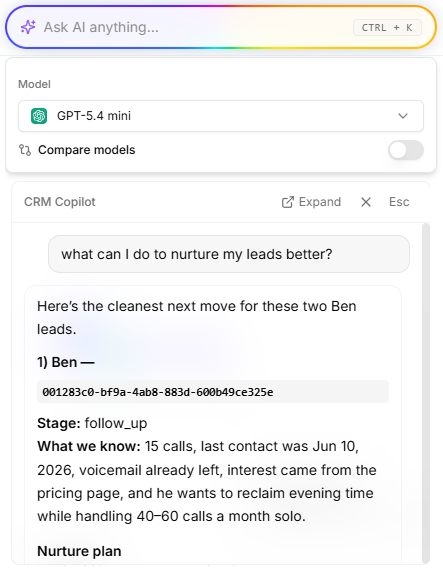
CRM Copilot feature overview

Capabilities

What CRM Copilot does for your business

Natural language search icon
01

Natural language search

Ask questions the way you would ask a teammate. Copilot understands context across leads, calls, chats, emails, SMS, tasks, appointments, custom fields, and account settings.

Cited answers from real conversations icon
02

Cited answers from real conversations

Every answer links back to the call recording, chat transcript, email thread, message, or note it came from. Verify before you reply.

Cross-channel memory icon
03

Cross-channel memory

Search phone calls, website chats, SMS threads, inbound email replies, outbound messages, and notes in one query. One customer record behind all channels.

Pipeline, campaign, and account questions icon
04

Pipeline, campaign, and account questions

Ask which leads went quiet, which campaign created booked jobs, who requested a callback, or what was promised on the last service call.

Availability-aware scheduling icon
05

Availability-aware scheduling

Ask Copilot to schedule and it checks appointment type, company hours, event availability, and existing bookings before proposing or confirming a time.

Drafts and propose-to-confirm actions icon
06

Drafts and propose-to-confirm actions

Generate an email reply, propose a CRM update, or prepare a booking card from context. You approve write actions before they change customer records.

Model choice and comparison icon
07

Model choice and comparison

Bring your own AI provider keys, select a preferred model, or compare multiple answers side by side for high-stakes customer questions.

Credit-based usage icon
08

Credit-based usage

Copilot usage is billed in credits with consent before charged actions. No surprise per-seat AI add-on on top of your CRM bill.

Why DialWise

More than a memory layer

AI-native CRMs market "customer memory" for sales teams reviewing deal history. DialWise Copilot searches the conversations your phone employees, chatbots, email threads, SMS, campaigns, and workflows already captured. Memory comes from action, not from reps logging notes after the fact.

FAQ


Straight answers on how this feature fits your front office.

What data does CRM Copilot search?

Get Started


You know what that missed 9pm call was worth. DialWise makes sure you're not running that number in your head again.